







Overview:
The PA-220R is a next-generation firewall appliance in a ruggedized form factor, providing rock-solid network security for severe environments, such as utility substations, power plants, manufacturing plants, oil and gas facilities, building management systems and healthcare networks.
The controlling element of the Palo Alto® PA-220R is PAN-OS® security operating system, which natively classifies all traffic, inclusive of applications, threats and content, and then ties that traffic to the user, regardless of location or device type. The application, content and user – in other words, the elements that run your business – are then used as the basis of your security policies, resulting in an improved security posture and a reduction in incident response time.
Features:
- 500 Mbps firewall throughput1
- 150 Mbps Threat Prevention throughput2
- 100 Mbps IPsec VPN throughput
- 64,000 max sessions
- 4,200 new sessions per second3
- 1,000 IPsec VPN tunnels/tunnel interfaces
- 3 virtual routers
- 15 security zones
- 250 max number of policies
Front Panel:
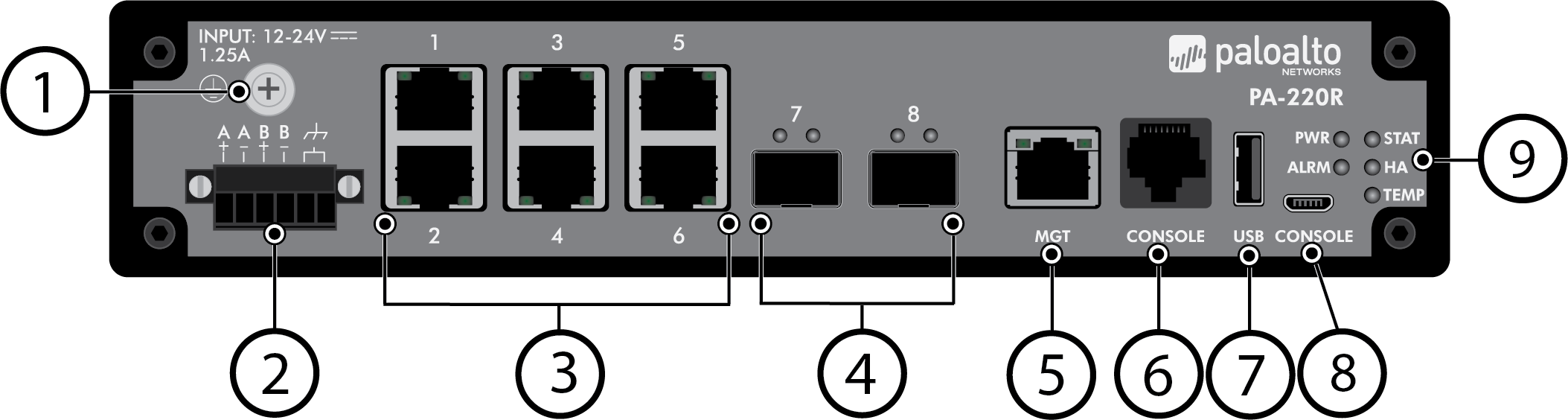
| Item | Component | Description |
|---|---|---|
| 1 | Screw-on ground point | Use this ground point to connect the firewall to earth ground (ground cable not included). |
| 2 | DC power and ground inputs | Use the DC input terminal block to connect DC power to the firewall. The terminal block is included in the accessories kit and is labeled A+, A-, B+, and B-. The two inputs to the right of the four DC power inputs are ground inputs (use only one) that you can use in place of the screw-on ground point on the firewall (see Connect Power to a PA-220R Firewall ). |
| 3 | Ethernet ports 1 through 6 | Six RJ-45 10Mbps/100Mbps/1000Mbps ports for network traffic. You can set the link speed and duplex or choose auto-negotiate for each port. These ports also have built-in surge protection. |
| 4 | SFP ports 7 and 8 | Two SFP (1Gbps) ports for network traffic. These ports also support 100Base-FX. |
| 5 | MGT port | Use this Ethernet 10Mbps/100Mbps/1000Mbps port to access the management web interface and perform administrative tasks. The firewall also uses this port for management services, such as retrieving licenses and updating the threat and application signatures. |
| 6 | CONSOLE port (RJ-45) | Use this port to connect a management computer to the firewall using a 9-pin serial-to-RJ-45 cable and terminal emulation software. The console connection provides access to firewall boot messages, the Maintenance Recovery Tool (MRT), and the command line interface (CLI). If your management computer does not have a serial port, use a USB-to-serial converter. Use the following settings to configure your terminal emulation software to connect to the console port:
|
| 7 | USB | A USB port that accepts a USB flash drive with a bootstrap bundle (PAN-OS configuration). Bootstrapping speeds up the process of configuring and licensing the firewall to make it operational on the network with or without internet access. |
| 8 | CONSOLE port (Micro USB) | Use this port to connect a management computer to the firewall using a standard Type-A USB-to-micro USB cable. The console connection provides access to firewall boot messages, the Maintenance Recovery Tool (MRT), and the command line interface (CLI). Refer to the Micro USB Console Port page for more information and to download the Windows driver or to learn how to connect from a Mac computer. |
| 9 | LED status indicators | Five LEDs that indicate the status of the firewall hardware components (see PA-220R Status LEDs ). |
Back Panel:

The following image shows the back panel of the PA-220R firewall. The only usable components on the back panel are the two screw holes used to Install the PA-220R Firewall on a DIN Rail . There are also two DIN-bracket screw holes (not shown) on the bottom of the firewall.
We can ship to virtually any address in the world. Note that there are restrictions on some products, and some products cannot be ship to international destinations.
Please also note that the shipping rates for many items we sell are weight-based. The weight of any such item can be found on its detail page. To reflect the policies of the shipping companies we use, all weights will be rounded up to the next full pound.